Table of Content
Are You Connecting as a Customer or an Owner?
Customers join the machine’s WiFi and open its advertised portal to buy time, redeem a voucher or check a session. AdoPiSoft’s example owner address is http://10.0.0.1/admin. If you arrived there while trying to buy internet access, return to the customer address printed on the machine.
Owners sign in with the administrator account created during setup. Once connected, use the customer’s device record to check their time or data balance. 10.0.0.1 Admin explains owner access and account recovery; the session controls below are specific to AdoPiSoft.
Why Can Internet Stop While Minutes Remain?
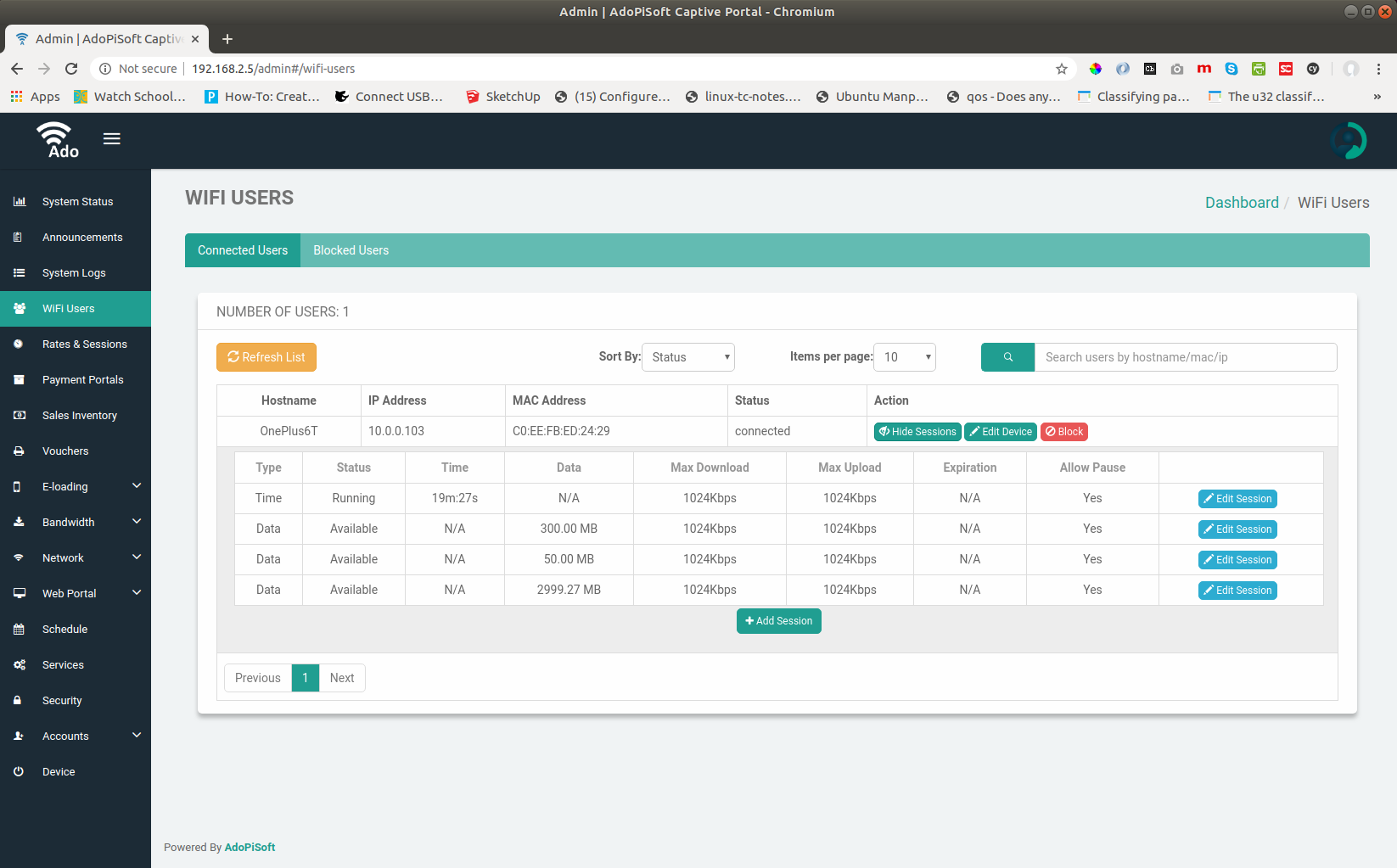
AdoPiSoft supports time, data and time-with-data-cap plans. On a capped plan, an empty data allowance can end access while the timer still shows minutes. Read the session’s status and limits before adding credit.
- Data exhausted: find out whether the proposed top-up adds data; extra minutes alone may not solve it.
- Paused: resume the session through the available customer control.
- Expired: the session has passed its expiry deadline, even if minutes or data remain.
- Active with usable allowance: try a website. If it does not open, ask the operator to check the internet connection and any restriction on your device.
How Should You Start a Coin Session?
AdoPiSoft lets the owner set a collection waiting period and retry limit. Have the accepted coins ready before opening that timed window.
- Select the offer and payment location. Check the time or data included and choose the correct coin slot if several are listed.
- Start collection. Wait for the instruction, then insert coins within the displayed countdown.
- Watch the detected amount. Stop if an accepted coin is missing from the total.
- Finish the purchase. Confirm when prompted and check that the purchased time or data appears.
If the slot stays busy, contact the operator instead of repeatedly opening collection without paying. AdoPiSoft documents that reaching the configured Insert Coin retry limit without inserting coins can block a device.
Can an AdoPiSoft Voucher Be Paused?
AdoPiSoft’s documented Vouchers settings include Allow Pause, Expiration and Maximum Users Per Voucher. A voucher can have minutes left while its rules still prevent pausing or sharing. Ask for those conditions before purchasing it for several short visits.
When Pause is available, use it and wait for confirmation before leaving. If it is missing, the owner should check the voucher rules and the session it created rather than change your phone settings. Even a voucher that allows Pause still has its own expiry deadline.
What If the Portal No Longer Recognizes Your Session?
Reconnect with the original phone and browser first. If the problem began after changing private-address settings or clearing browser information, tell the operator what changed.
AdoPiSoft’s Network → Security → Pass Code option provides an additional session identity. Its documentation describes using the previous passcode when a changed MAC address and failed cookie synchronization prevent the old session from being recognized. If your portal offers that recovery prompt, enter the passcode previously assigned to the hotspot session then check that your previous balance and expiry have returned. A wallet PIN or payment verification code is unrelated.
What Should Owners Check Before Changing Settings?
For an individual complaint, use AdoPiSoft’s documented device controls before changing a rate for all customers:
- Open WiFi Devices. Under All Devices, find the customer by alias, hostname, IP or MAC address.
- Open Options → View Available Session Details. Inspect Status, Type, Time, Data, Expiration and Allow Pause for that record.
- Use Edit Session for an agreed correction. This control can adjust an existing allowance and its session limits. Record the original value first.
- Reopen the session details. Check the saved result with the customer and verify the expected access.
If a purchase was not credited correctly, open Activity Logs for the reported time. AdoPiSoft records events including coin insertion and session starts or stops. Keep those records while investigating.

FAQs
Can a voucher cover more than one user?
Only within its configured Maximum Users Per Voucher. The seller should state that limit; having the code does not mean that unlimited users can share it.
Can an owner restore access to a blocked device?
AdoPiSoft documents an Unblock control under Blocked Devices. The owner should first check whether the block was deliberate or followed failed coin-collection attempts, then resolve the cause.
Conclusion
AdoPiSoft’s separate time, data, expiry and pause controls explain why a visible timer is only part of the answer. Follow the collection countdown when buying with coins, and know the voucher’s limits before using it across several visits.
When a session needs attention, the device record gives the owner a precise starting point. Check its balance and limits, use the relevant recovery or edit control, and confirm the result with the customer. That keeps a single customer’s problem from turning into an unnecessary change to everyone’s service.