Table of Content
Check the Session Before You Leave
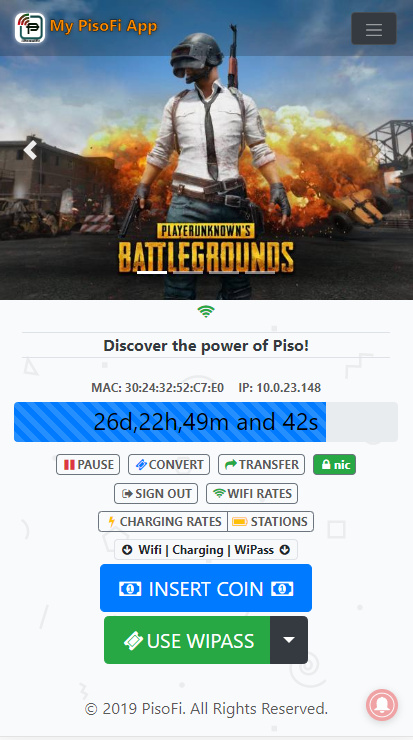
To pause a paid session, stay connected to the hotspot, open its portal and select Pause. Wait for the status to change to Paused before leaving. When you return, reconnect and use Resume or Continue if the session is still valid.
Open 10.0.0.1 when that is your hotspot’s address; otherwise use the address printed on the machine. The request must reach the hotspot holding your balance.
What Does Pause Time Actually Mean?
Pause lets you stop a session that allows it and return to the unused time or data. Read these four details together:
- Remaining allowance: how much time or data you have left.
- Session status: whether that allowance is active or paused.
- Expiry: the deadline for using the purchase.
- Pause limit: whether another pause is permitted.
These are separate conditions. A large balance does not guarantee that the session can be paused again or used tomorrow.
Are Pause, Logout, and Disconnect the Same Thing?
- Pause requests the hotspot’s pause function for your paid session.
- Logout signs you out of the session. The operator’s rules determine how you sign in again and what allowance remains.
- Disconnect leaves WiFi. It does not confirm that the billing timer stopped.
Use Pause when your aim is to save time. Closing a browser tab or seeing browsing stop is not a substitute for the portal’s confirmation.
How Do You Pause an Active Session?
- Open your current session. Stay on the same hotspot and use the portal where you bought access. Finish any payment already in progress first. If the portal will not open, check the network and address with Piso WiFi Login.
- Read the balance and expiry. Note the remaining allowance, expiry and any pause limit.
- Select Pause once. Complete the confirmation prompt if shown and wait for the request to finish.
- Look for Paused. Look for Paused or a clear confirmation. A frozen countdown alone is not enough: the browser may simply have stopped refreshing.
- Keep the details for your return. Save the balance and expiry if useful. If an error appears or the status remains Active, resolve that before assuming your time is saved.
How Do You Resume Your Remaining Time?
- Reconnect to the same hotspot. Start with the same device and browser, keeping its WiFi privacy settings unchanged while checking the balance.
- Find the earlier session. Compare the allowance and expiry with the details you saved. If it is missing, check the WiFi name.
- Select Resume or Continue. Wait for the status to show Active. If the installation resumed automatically, no further press is needed.
- Test the connection. Open a website you normally visit. An active session that cannot browse needs a connection check, not repeated resume requests.
Can Paused Minutes Still Expire?
Yes. Stopping the paid timer does not necessarily move the purchase’s expiry deadline. There is no single 24-hour expiry or unlimited-pause rule shared by all Piso WiFi machines.
Suppose a package has 40 minutes left and expires at 8:00 p.m. You pause at 7:20 p.m. and return at 8:10 p.m. The deadline has passed despite those unused minutes. This example describes a fixed-expiry package; another offer may use a different rule.
Before a long break, ask the operator: “What time does this purchase expire, and does Pause change that time?”
Why Is the Pause Button Missing or Unavailable?
Read the session status and any message beside the control. Those details usually tell you more than refreshing the browser.
| What you notice | What to check next |
|---|---|
| The session is already paused | Look for Resume or Continue; the portal may no longer show the control used by an active session. |
| There is no active paid session | Confirm the purchase was credited and started, and that you are viewing the correct device or customer account. |
| A pause-limit message appears | Read the stated limit or ask the operator whether you have used all the permitted pauses. |
| The package says pause is unavailable | Treat that as a rule of the purchased session unless the operator confirms a mistake. |
| The interface differs from a screenshot | Check the platform, version and portal design; menu placement is not universal. |
| A button is visible but fails | Keep the exact error, check the connection and ask the operator to check the session. |
For AdoPiSoft owners: its documented Wifi Devices controls let you find the customer’s device and open Options > Edit Session to inspect pause permission. The session details also show Allow Pause and expiration. Check the selected customer and the package sold before changing either setting.

Does Turning Off WiFi Pause the Timer?
Only when the operator enables automatic pause for that condition. In AdoPiSoft’s documented Session Settings > Online Status Checking, disconnect/inactivity pause, reconnect resume and pause during an internet outage are separate options. Their presence in the software does not mean all are enabled at your machine.
If WiFi disappears before you can check the status, note when access stopped and the last balance you saw. Ask the operator to compare those details with the session records.
Can You Resume on Another Phone or Machine?
Ask the operator whether your purchase supports a device transfer, customer account or shared service across locations. The address 10.0.0.1 does not carry a balance between unrelated machines. LPB Piso WiFi explains its documented sharing feature and version requirements.
If credit disappears after changing a private or randomized WiFi address, mention that change to the operator. It can affect device recognition. Keep privacy protection enabled where supported rather than changing it across all your networks to recover one session.
What Should You Send the Operator When Resume Fails?
Give the operator enough detail to locate the original session:
- Hotspot: WiFi name and machine location.
- Purchase: amount, payment method, time and receipt or reference.
- Pause: approximate time, confirmation and saved balance.
- Return: exact error and any change of device, browser, account or WiFi privacy setting.
For example: “I bought time at 3:15 p.m., paused around 3:40 p.m., and the same phone now shows no session on the same WiFi.” Send receipts privately and keep usable voucher codes out of public posts.
If the portal itself is unreachable, start with 10.0.0.1 Not Working?. If it opens but the balance is absent, use the transaction checks in Payments and Remaining Time.
FAQs
Is Piso WiFi pause time unlimited?
Only if the purchased offer allows it. The operator can set a pause count and a separate expiry.
Will my time pause when I close the portal tab?
Not necessarily. Confirm Pause in the portal unless the operator has specified automatic behavior for your session.
Why do I have minutes left but cannot resume?
Check expiry, data allowance and the recognized device or account. Remaining minutes are only one condition for access.
Can a website pause my session for me?
Only the hotspot or an authorized service connected to it can handle that request. This website cannot stop your timer.
What if I accidentally resumed my session?
Use Pause again if another pause is permitted, and wait for confirmation. If the limit blocks it, ask the operator.
Can the owner restore expired time?
The operator needs to check the record, the purchase terms and whether the software allows an adjustment. Expired time is not restored automatically.
Conclusion
Before leaving, look for Paused and note the balance and expiry. Those details tell you how much time or data remains and when you must return to use it.
On your return, check the original session before making a new purchase. If it cannot resume, report the pause time and exact result. The operator can then find the session and compare what happened when you paused with what happened when you returned.