Save available media from public TikTok posts directly from your browser. Paste a TikTok link to check the post and choose from the download options that are actually available for that content, including video without watermark, the original watermarked version when available, audio, photos, thumbnails and captions.
No TikTok login is required.
Paste a public TikTok link above to get started.
Download TikTok Videos Without Watermark
SnapTik is a browser based TikTok downloader built for one simple job: turning a public TikTok post link into useful download options.
Instead of asking you to upload the video first, SnapTik checks the link you provide, identifies the type of post and displays the media formats that can be retrieved from that source. A normal TikTok video may provide an MP4 without watermark, a separate watermarked version, audio, a cover image and caption information. A photo post or slideshow can return a different set of results.
The available buttons depend on the post itself. SnapTik does not invent a second download option when a separate file does not exist, and it does not label low resolution media as 4K simply because a larger number sounds better.
If the source provides a higher quality video, SnapTik can show that version. If the source contains only a lower resolution file, the downloader cannot restore detail that was never present in the original media.
This approach keeps the results straightforward: you see the formats that are available for the TikTok link you entered.
How to Download a TikTok Video With SnapTik
1
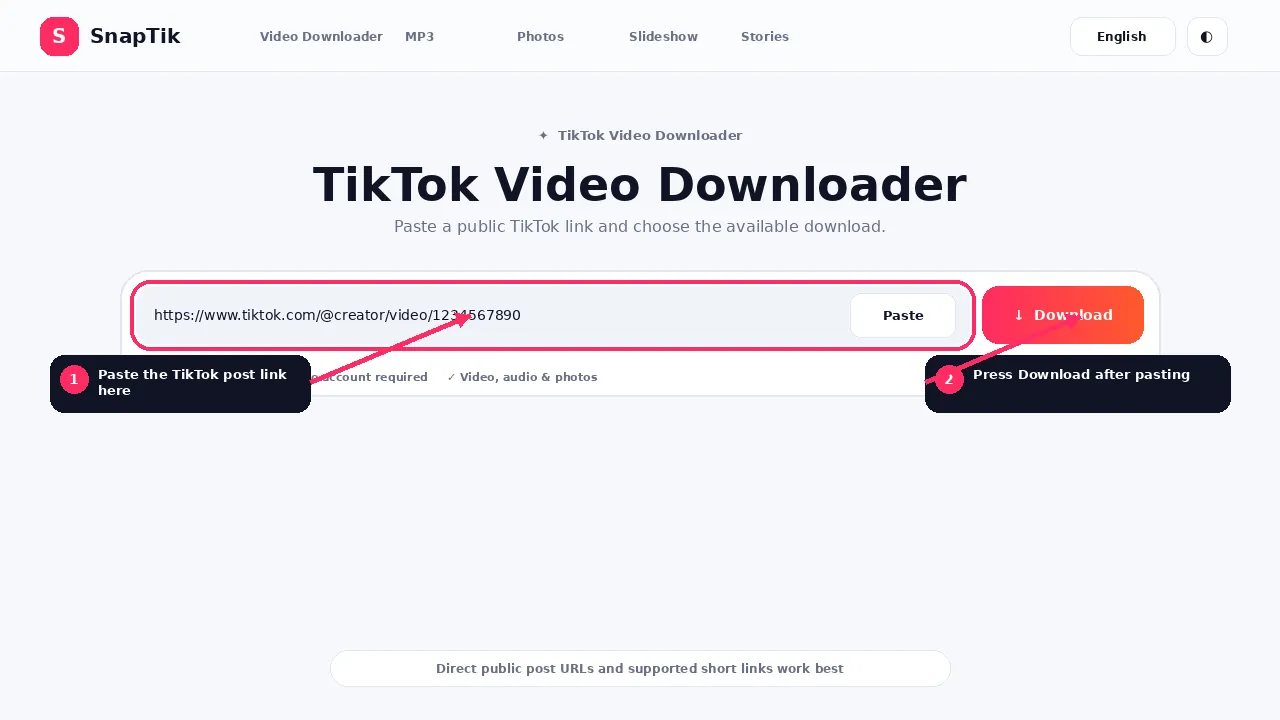
1. Copy the TikTok link
Open the TikTok post you want to save.
Use the Share option and choose Copy link. On a desktop browser, you can also copy the TikTok post URL from the browser address bar when the complete post is open.
2
2. Paste the link into SnapTik
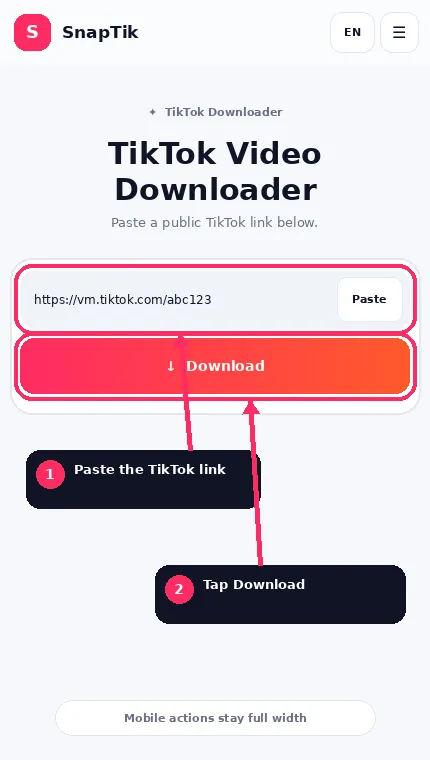
Return to SnapTik and paste the copied TikTok URL into the downloader field at the top of this page.
Press Download.
SnapTik will check the link and determine which media options can be returned.
3
3. Choose the file you want
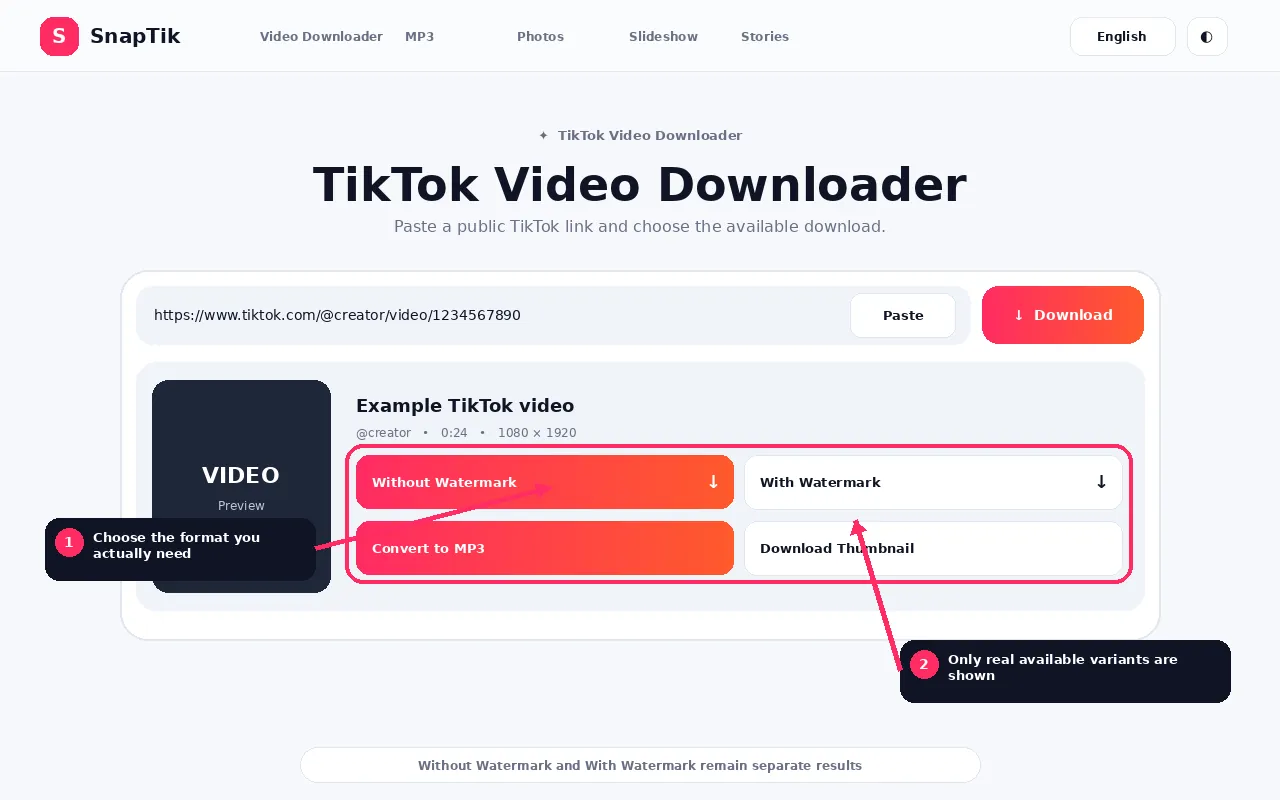
Depending on the TikTok post, the results may include:
Without Watermark
With Watermark
Download Audio
Download MP3
Download Thumbnail
Download Photos
Download All Photos
Copy Caption
Download Caption
Choose the format that matches what you need.
If a particular option is not available from the source, SnapTik will not display a fake replacement for it.
Einfügen → Herunterladen
Tip: use the direct post link rather than a creator profile, search page or copied caption. A direct post URL gives the downloader a specific media item to inspect.
What Can You Download With SnapTik?
TikTok includes more than ordinary video posts, so SnapTik is designed around different types of public media rather than treating every URL as exactly the same thing.
TikTok Videos
Download available TikTok video files in MP4 format. When the source provides a clean video stream, the result can include a Without Watermark option.
TikTok Audio
Some posts provide a separate audio track. SnapTik can expose available source audio and, when available, convert compatible media into MP3.
Source audio and an MP3 conversion are not necessarily the same thing. The dedicated TikTok MP3 Downloader explains the difference in more detail.
TikTok Photos
TikTok photo posts can contain multiple images. SnapTik can identify supported image posts and return the available photos individually.
TikTok Slideshows
A slideshow may contain several photos plus audio.
TikTok Stories
Active public TikTok Stories can require different handling from permanent video posts because Story content is temporary.
A TikTok video can include a cover or preview image. SnapTik can make that image available separately when the post metadata provides it.
TikTok Captions
If caption text is available with the post, SnapTik can display it so you can copy it or save it as text without manually retyping hashtags, mentions or the visible description.
SnapTik Features in Detail
The most useful features are the ones that match the post you actually pasted. SnapTik keeps video, audio, photos, captions and quality choices separate so you can choose the file you need without guessing.
Clean video when available
When the downloader identifies a genuine clean video source, SnapTik shows a Without Watermark action. The site does not create a fake clean copy by blurring or covering an existing watermark.
Original watermarked version
Some users want the version that retains visible TikTok branding or creator context. A separate With Watermark button appears only when a distinct watermarked source is actually returned.
Highest available source
SnapTik prefers useful source media rather than inventing quality labels. When more than one video source exists, the result can expose the better available stream without claiming that every TikTok is 1080p or 4K.
Real MP3 conversion
When MP3 conversion is available, compatible media is converted into an actual MP3 file rather than simply being renamed with an .mp3 extension.
Original audio access
When a post exposes a separate audio track, SnapTik can offer it directly so you do not need to download the whole video just to keep the sound.
Photo post downloads
Photo posts are treated as image collections instead of being forced into a video workflow. Supported images can be downloaded individually at the media quality returned by the source.
Download photo sets together
When Download All is available, multiple images from the same supported post can be packaged together so you do not need to save each photo one by one.
Slideshow-aware results
Slideshows can expose images, audio and other media separately. SnapTik keeps those components clear so users understand whether they are saving original images or a generated slideshow file.
Active public Story support
Stories have a different lifecycle from normal posts. The Story workflow is designed for supported active public Story links and explains expired or unavailable results instead of returning a generic error.
Thumbnail and cover image
When TikTok provides a cover image, SnapTik can expose it separately. This is more accurate than taking a random frame from the downloaded video and calling it the original thumbnail.
Caption extraction
Available post text can be displayed separately so users can copy or save the caption without manually retyping hashtags and mentions. Missing metadata is not invented.
No TikTok password
The public-media workflow does not require TikTok login credentials. Private and authenticated content is treated as unavailable rather than asking users to hand over account access.
Available in 30 languages
SnapTik is designed for multiple languages, and language switching can keep you on the equivalent downloader or guide instead of sending you back to a generic homepage.
Short-link resolution
Supported TikTok share links can redirect before reaching the final post. SnapTik follows the supported redirect so the correct public post can be checked.
More than one download option
If one download option is temporarily unavailable, SnapTik can try another supported method before returning an error.
Choose the Right SnapTik Tool
You can use the main downloader above for supported TikTok links, but dedicated tools are available when you already know what type of media you want.
TikTok Video Downloader
Use the TikTok Video Downloader when your main goal is saving a TikTok video as MP4 and checking which watermark and quality options are available.
TikTok MP3 Downloader
Use the TikTok MP3 Downloader when you want audio from a TikTok post without keeping the complete video.
SnapTik also includes a dedicated Douyin Downloader for supported public Douyin video links. TikTok and Douyin use different link structures, so Douyin has its own page rather than being mixed into the main TikTok instructions.
Without Watermark vs With Watermark
These two download options serve different purposes and should not be confused.
Without Watermark
A Without Watermark result is a video source that does not contain the usual visible TikTok watermark overlay.
This option appears when SnapTik can obtain a compatible clean video source for the public post.
With Watermark
A With Watermark result preserves the version containing TikTok branding or creator identification when a separate watermarked source is available.
SnapTik does not create a fake watermarked button by pointing it to the exact same file as the clean download.
If only one genuine version is available, only that valid option should be shown.
Which should you choose?
Ohne Wasserzeichen • Mit Wasserzeichen • In MP3 umwandeln
That depends on why you are saving the video.
A clean file can be useful when you are saving your own work, archiving media you have permission to use or working with a source file separately.
A watermarked copy can preserve visible platform and creator context.
Whichever format you download, the file does not become yours simply because you downloaded it. Copyright, privacy, licensing and permission still apply to how the media can be reused.
TikTok Video Quality: HD, 1080p and Higher Resolutions
Video quality labels can be confusing because a downloader cannot manufacture genuine detail that is absent from the source.
SnapTik therefore treats quality as a property of the media source rather than a marketing promise.
If a post provides a high resolution video stream, that version can be presented in the results. If the available source is smaller or more heavily compressed, downloading it through another website does not recreate missing pixels or restore detail that TikTok never supplied in that stream.
Does SnapTik always provide 1080p?
No downloader should promise that every TikTok post is available in 1080p. The available resolution depends on the media source returned for that particular post.
Can SnapTik download 4K TikTok videos?
If a genuinely higher resolution source is available and SnapTik finds it, SnapTik can expose that source. SnapTik does not simply upscale a smaller video and call it 4K.
SnapTik is designed for direct links to supported public TikTok posts.
A valid link normally identifies a specific post rather than a general profile, search page or hashtag page.
A TikTok post may be shared using a full post URL or a short sharing link. SnapTik resolves supported short links before processing the underlying post.
A downloader may be unable to process a link when the URL is incomplete, the post has been deleted, the post is private, access is restricted, the URL points to a profile rather than a specific post, the post format is not currently supported or TikTok has temporarily changed how the media is delivered.
Public TikTok Posts Only
SnapTik is intended for media that is publicly accessible through a normal TikTok link.
It is not designed to bypass private accounts, login requirements, access restrictions, deleted posts, creator privacy settings or authentication controls.
If a post is not publicly accessible, the correct result is an unavailable message rather than pretending the restriction can be defeated.
On smaller screens the URL field, Paste action and Download button stack cleanly, result actions become full width, and media previews stay inside the viewport. The goal is to let a visitor complete the whole process without zooming or hunting for a hidden button.
The same tool remains available in the selected language, so switching language does not change the basic workflow.
Einfügen → Herunterladen
What Happens After You Paste a TikTok Link?
SnapTik first checks that the URL points to a supported TikTok or Douyin address. Short sharing links are followed to the final public post when possible.
The downloader then checks which media types are actually available for that post. It may use more than one supported download option if the first one is temporarily unavailable.
When media is found, SnapTik creates a temporary download session and displays only the choices that exist for that result. That is why two TikTok posts can produce different buttons.
Why Does One TikTok Show More Download Options Than Another?
TikTok posts are not identical.
A standard video, photo post, slideshow and Story contain different media structures. Even two ordinary videos can expose different combinations of clean video, watermarked video, separate audio, cover image, caption and available resolutions.
A result with fewer buttons does not automatically mean the downloader is broken. It may simply mean fewer separate media sources were available for that post.
SnapTik and MP3 Downloads
A common misunderstanding is that every TikTok audio download is automatically an MP3.
That is not always true.
A download option may return the post original audio stream in another format. A real MP3 conversion requires the audio or video to be decoded and encoded into MP3 format.
When the SnapTik server has audio conversion support enabled, compatible media can be converted into an actual MP3 file. Changing a filename extension alone is not treated as conversion.
Understanding Each Download Option
The result screen can show different actions for different posts. This table explains what each action is intended to mean so the visitor can choose the right file instead of guessing from a button label.
Option
What it means
When it appears
Without Watermark
A clean video source available for the public post.
Only when a genuine clean stream is available.
With Watermark
A distinct video source retaining TikTok watermarking or branding.
Only when the downloader returns a separate watermarked source.
Source Audio
The separate audio resource returned with the post.
When audio is exposed independently from the video.
MP3
An MP3 file created through real MP3 conversion.
When compatible media can be converted to MP3.
Photo
An individual image from a supported photo or slideshow post.
When the post contains image media.
Download All
A ZIP package containing the available images from the post.
When multiple images can be packaged together.
Thumbnail
The cover image returned in the post metadata.
When a cover or thumbnail URL is available.
Caption
The text description returned with the post metadata.
When caption text is available.
Temporary Download Sessions
The downloader uses short lived download sessions for processed results.
That means old media links can expire rather than acting as permanent unrestricted proxy URLs. If a download session expires, process the TikTok link again to create a fresh result.
When a TikTok Download Does Not Work
A failed TikTok download does not always have the same cause.
Common causes include an invalid link, private or deleted content, an expired Story, a regional or authentication restriction, a temporary download problem or a browser download problem.
An invalid URL, unavailable post and temporary download option failure should not all be treated as the same problem. Re-copy the direct post link first. If it opens publicly in a logged-out browser but SnapTik still cannot process it, the downloader or platform delivery method may be the issue.
Do not repeatedly submit a private link
Repeated attempts do not make an authenticated or private post public. If the content is restricted, use the platform and account tools that are authorized for that content.
Check the browser after processing succeeds
If SnapTik shows a valid result but the file does not appear, inspect the browser download list, storage permission and device free space. At that point the extraction step may already have succeeded and the problem is local file handling.
Where Are SnapTik Downloads Saved?
SnapTik sends the selected file to your browser. The browser and operating system decide where that file is stored.
Common locations include the Downloads folder, browser download list, Android Files app or iPhone and iPad Files app.
Downloading a file and owning the rights to that file are different things.
Creators, photographers, musicians, publishers and other rights holders may have rights in the video, audio, images or other material contained in a TikTok post.
Use SnapTik for content you have the right or permission to save and use. Removing a visible watermark does not remove copyright, attribution requirements, privacy interests or other rights.
Download time depends on the post, your connection, source-media size and current platform availability. SnapTik avoids promising the same number of seconds for every visitor.
The pages are intentionally lightweight, with local icons, optimized guide images and responsive layouts so the downloader remains easy to reach on mobile and desktop.
What SnapTik avoids
duplicate buttons that point to the same file under different labels
claiming every post is available in 4K
requiring an account for ordinary public downloads
large decorative assets that slow the main downloader experience
Frequently Asked Questions
What is SnapTik?
SnapTik is a browser based downloader for supported public TikTok media. It can process eligible TikTok links and display the available video, audio, photo, slideshow, thumbnail or caption download options returned for that post.
How do I download a TikTok video?
Copy the link to the TikTok post, paste it into the SnapTik downloader and press Download. When processing finishes, choose one of the available media options.
Can SnapTik download TikTok videos without watermark?
When a supported public post provides a clean video source that SnapTik can retrieve, the results can include a Without Watermark download.
Can I also download the version with a watermark?
Yes, when a genuine separate watermarked source is returned. SnapTik shows With Watermark only when that version actually exists in the processed result.
Do I need to install an app?
No installation is required to use the web downloader.
Do I need a TikTok account?
A TikTok account is not required for ordinary supported public post links.
Does SnapTik work on Android?
Yes. Copy a TikTok link, open SnapTik in a mobile browser, paste the URL and choose an available download option.
Does SnapTik work on iPhone and iPad?
Yes. Modern Safari supports direct file downloads. Files normally appear in Safari downloads and the Files app, depending on your device settings.
Can SnapTik download MP3?
When the required media source and server conversion capability are available, SnapTik can provide MP3 output for supported posts.
Can I download TikTok photos?
Supported TikTok photo posts can return individual image downloads. When ZIP support is available on the server, multiple photos can also be downloaded together.
Can SnapTik download private TikTok videos?
No. SnapTik is designed for publicly accessible media and does not bypass private accounts, authentication or access restrictions.
Does every TikTok video have a 1080p or 4K version?
No. Resolution depends on the original post and the media streams available for that post.
Where is my downloaded video?
Check your browser Downloads section or your device Downloads folder or Files application.
Does SnapTik require my TikTok password?
No. Do not enter TikTok login information into the SnapTik downloader.
Is SnapTik affiliated with TikTok?
No. SnapTik is an independent service and is not TikTok or ByteDance.
Download Your TikTok Media
Have a public TikTok link ready?
Paste it into the downloader and SnapTik will check which download options are available for that post.
Important: Use the downloader only for content you have the right or permission to save and use.